
OmoroShoot briefRoll 043Ser.05
Xerox aesthetic photography reference
RecTC 00:00:00:00

Xerox

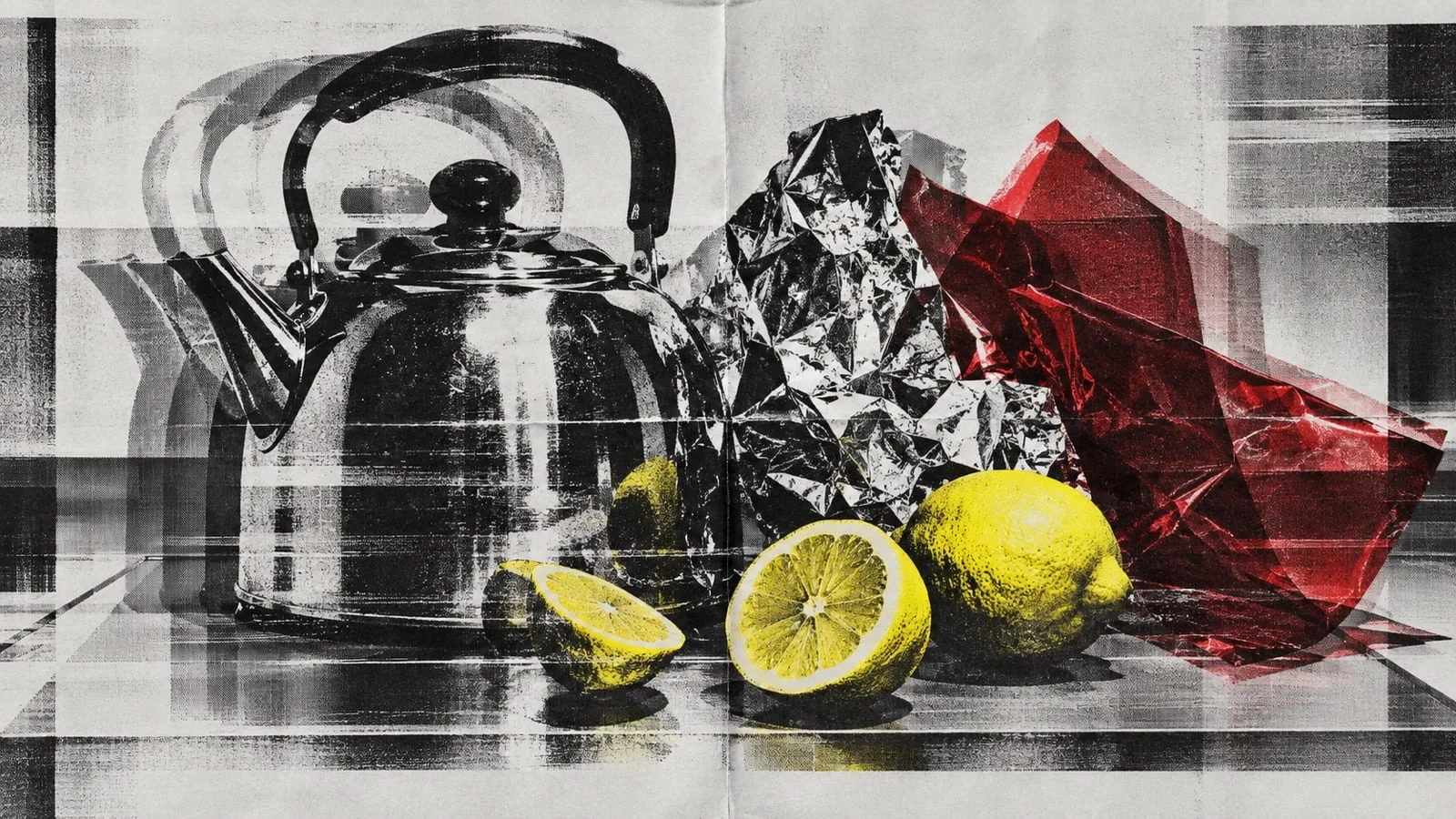
Copy it, then copy the copy: let the machine take detail away until only the structure is left

Histogram
Set on the viewfinder
Lens
50mm
Aperture
f/5.6
Shutter
1/125
ISO
400
WB
5200K
Roll 0430 / 5 shot
Frames00/05
xerox
SET

The setup

Shoot briefHD[xerox         ]00:00:00:00Stop ■
Brief Int(xerox_______.BRF)

Xerox

01 LightWhatever the original was lit with; the copier's own light does the rest. Photograph the finished copies flat in soft, even daylight so the paper, toner and dust read, with no dramatic lighting added on top.
02 WardrobePlain clothes with strong silhouettes that survive losing their mid-tones: black, white, one flat colour. Avoid fine patterns, which turn to moiré, and any logos. Every figure whole, face included.
03 LocationA copy shop or studio with a large-format copier
04 Palette
DIR

Director's note

The process has to change the image. Copy the original, copy the copy and stop when the structure starts to break: mid-tones gone, edges doubled, dots coarse. Move the sheet on the glass for skew and doubling, let dust and fingerprints stay, add at most one colour on a second pass and let it slip. No smooth digital grain, no grunge overlays, no clean vector layouts, no ransom-note type unless the brief is actually punk, and never a figure without a head.

Get 151 director’s notes, printable: Director’s Briefs, $8 →
VF

Viewfinder

Live

Five controls on the brief's own plate, or on your own camera · the meter is real, so you can blow a frame

Xerox reference frame
Standby50mmf/5.6 · 1/125 · ISO 400
Zoom50mm
Aperturef/5.6
Shutter1/125
ISO400
White balance5200K

Running the list sets the camera for every shot in turn. Load your own photo to light and expose a frame you actually shot.

LGT

Light the set

3 lamps

Drag a lamp and watch the frame above change. The brief's own note is the preset

KeyThe light that makes the pictureSoft, farEye level
FillHow far into shadow you can seeHard, closeEye level
BackRound at the front, where it is just another fillOffEye level
On the brief
CS

Contact sheet

00 / 12

Nothing on the sheet yet. Set the camera, then take a frame.

SEQ

Shot list

00 / 05

Tap a pad to mark the frame shot · saved on this device

A full-length fashion portrait copied several generations deep on off-white paper: black toner, blown highlights, the figure doubled where the original moved on the glassportrait85mmthru glass
A three-quarter portrait of a musician, cropped hard by the edge of the copier glass, coarse halftone dots across the face and a single cobalt registration layer slipped to one sideportrait85mmthru glass
Close detail of a copied page showing scanner bands, toner specks, a fingerprint and the shadow of tape at the edgedetail100mm
Close material detail of stacked copier paper, acetate sheets, staples and a creased fourth-generation copydetail100mm
A wide wall of copied posters and programmes for a cultural season, each sheet a slightly different generation of the same imagewide24mm
Rolling
Take it to set: all 151 briefs as one PDF · $8
LOC

Locations

04
A copy shop or studio with a large-format copierA print room or publishing studioA gallery or cultural venue wallA plain studio for the original portraits
REF

Explore the aesthetic

Style guideColor palette
DOC

About this brief

How do I photograph the Xerox aesthetic?

Copy it, then copy the copy: let the machine take detail away until only the structure is left.

The process has to change the image. Copy the original, copy the copy and stop when the structure starts to break: mid-tones gone, edges doubled, dots coarse. Move the sheet on the glass for skew and doubling, let dust and fingerprints stay, add at most one colour on a second pass and let it slip. No smooth digital grain, no grunge overlays, no clean vector layouts, no ransom-note type unless the brief is actually punk, and never a figure without a head.

Director's note

What shots should I get for a Xerox photo shoot?

Leave with every frame on this list.

Shot list

  1. A full-length fashion portrait copied several generations deep on off-white paper: black toner, blown highlights, the figure doubled where the original moved on the glass
  2. A three-quarter portrait of a musician, cropped hard by the edge of the copier glass, coarse halftone dots across the face and a single cobalt registration layer slipped to one side
  3. Close detail of a copied page showing scanner bands, toner specks, a fingerprint and the shadow of tape at the edge
  4. Close material detail of stacked copier paper, acetate sheets, staples and a creased fourth-generation copy
  5. A wide wall of copied posters and programmes for a cultural season, each sheet a slightly different generation of the same image
What lighting works for Xerox photography?

Whatever the original was lit with; the copier's own light does the rest. Photograph the finished copies flat in soft, even daylight so the paper, toner and dust read, with no dramatic lighting added on top.

Light

Where should I shoot Xerox photography?

Scout these before anything else.

Locations

  1. A copy shop or studio with a large-format copier
  2. A print room or publishing studio
  3. A gallery or cultural venue wall
  4. A plain studio for the original portraits
What wardrobe works for Xerox photography?

Plain clothes with strong silhouettes that survive losing their mid-tones: black, white, one flat colour. Avoid fine patterns, which turn to moiré, and any logos. Every figure whole, face included.

Wardrobe

Omoro Studio · Creative System

Generate shoot references in the Xerox style

Omoro reads your visual references and generates images in your exact aesthetic. Build a mood board before the shoot or create composite references for your client.

Join the waitlist